Posts

Showing posts with the label i9000 Galaxy S

[i9000] Flashing CyanogenMod for Beginners

Image
UPDATE (2011-11-27) : After flashed to CyanogenMod and tested for a few days, I think that CyanogenMod is GREAT, i9000 users should just flash to it since Samsung firmware support for i9000 isn't that great, and slow. :) The guide can be found from  wiki.cyanogenmod.com . But its not complete with all the downloadables, there are few missing steps. 1. Installing the ClockworkMod Recovery Prerequisites: Before you begin, follow Step 1 & Step 2 from  CyanogenMod  to get the drivers installed. Downloadables & Installation Guide Heimdall Firmware Packages -  http://forum.xda-developers.com/showthread.php?t=1196179 (As of now, XXJVT is the latest version) 2. Root your Phone There are few options to root your phone. Gingerbreak  by ChainFire. CF-Root by ChainFire (works for XXJVT) I used CF-Root and it worked. Just a small note, if Odin cannot detect the phone, you can always reinstall the driver by running Kies devic...

Samsung Galaxy S i9000 Gingerbread (Android 2.3) Flashing Guide

Image
Android 2.3 Dropdown Notification Screen  Important Note: The following guide is for Indonesia, Malaysia, Singapore, Thailand, Vietnam. Please remember that flashing your mobile phone is fully on your own risk.  If the process is interupted (power failure, disconnected cable, software failure) your phone might be very dificult to revive. Don't confuse this guide for Samsung Galaxy S II. This is for the old old Samsung Galaxy S I. Pre-steps Make sure you disabled any "lag fix" that you've applied to your phone. Step 1 Download the firmware and Odin (flashing program) Firmware + Odin. (May 15, 2011 - I9000DXJV9  Mirror 1 | Mirror 2 ) Step 2 Prepare the flashing program. Extract the above file. Run Odin3 v1.82.exe Click on PDA, select the file  JV9_JV9_JV9.tar Make sure only "Auto Reboot" and "F. Reset Time" is selected. Step 3 Prepare you phone in "Download Mode" Turn off your phone. Press "Volum...

New Gingerbread Update for Samsung Galaxy S Leaks

Image
Yup, despite Sammy’s apparent inability to roll out Froyo updates on time, download links have popped up all over the internet this week, which provide access to a leaked official Gingerbread update to the I9000 model of its Galaxy S family. This may not be the first Gingerbread update to have been leaked for the device but the release is great news for developers and owners of the device alike, as it means that Android 2.3.3 has been tailored by Samsung specifically for its phones and that the update should roll out to all devices shortly... more Although the thread is now closed, but the ROMs already leaked far into many ROM chefs' hand. So, I would still expect custom Gingerbread ROM for Galaxy S to be out in a month time. Excited :)

Mobile Tracker for Samsung Galaxy S

Image
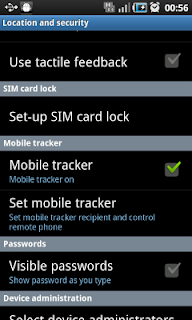
For Samsung Galaxy S owner (like me) out there, this is a post that guide you step by step to turn on Mobile Tracker on your phone. Mobile Tracker allows you to Receive notification when the SIM card in the phone is changed Remotely lock your phone Remotely wipe your phone Receive the location of your phone (not available in Singapore) To turn on the service. Go Settings -> Location and Security -> Mobile Tracker . You will be prompted to key in new password. Register (or login) a Samsung Account by selecting "Join Now" button at the bottom. Set the recipients to who you will want to be notified new SIM is inserted. Set the recipients to who you will want to be notified new SIM is inserted. Login at  http://www.samsungdive.com  to control your phone. :) References: http://www.samsung.com/sg/support/howtoguide/supportHowToGuidePopupPrint.do?howto_guide_seq=6182&howto_guide_step_no=1&prd_ia_cd=01010000&map_seq=35963

New Android Market

Image
Saw the post on new Android Market on XDA-Developers, and after restarting my Samsung Galaxy S, I found that my market has been updated too! For those who are looking for the apk (installer) for the new market, head over to the thread for the download.

Latest Samsung Kies

Image
I find that different Samsung sites update at different rate (For example:  samsungmobile.com.sg  always gives older Kies version than  samsung.com/sg/ .),  so I've decided to record the list of Samsung Kies that I've found here. Latest : [Feb 2011] - 2.0.0.11014.49  (Official Download) Older versions (Get the download mirror from the SamFirmware link below) : [01 Dec 2010] - Kies_1.5.3.10103_102  (Official Download) [15 Oct 2010] - Kies_1.5.3.10103_100_2 (Official Download) Kies_1.5.3.10093_31_1 Kies_1.5.3.10092_14 Kies_1.5.3.10092_2_1 Kies_1.5.1.10074_45 Kies_1.5.1.10074_2 Kies_1.5.1.10071_32 Kies_1.5.1.10062_42_2 Kies_1.5.1.10062_42_2 Kies_1.5.1.10054_79 Kies_1.5.0.10052 How to check your Kies version : References/Download Mirror(s) : http://www.samfirmware.com/samsungkies.htm

One Click Lag Fix for Samsung Galaxy S

Image
Can't wait for Samsung Singapore to release 2.2 Froyo with lag fix, so decided to give this One Click Lag Fix for Galaxy 2.1 Eclair a try. Prerequisites : Rooted Samsung i9000. (Follow this post , if you haven't root your phone). Instructions : Download OCLF2 .apk from xda-developers . Copy the .apk to your device, and install the application. Note: Make sure you have " Unknown sources " applications checked in " Settings > Applications > Unknown Sources ". Install the application (by clicking on it in " My Files "). Run the application. "Install EXT2 Tools". "OneClickLagFix V2.2+". Done, wait for the phone to reboot :) References : http://forum.xda-developers.com/showthread.php?t=784691

OneClick (un)root Samsung i9000 Galaxy S

Image
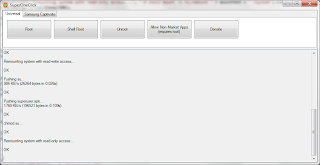
Been looking around for ways to (un)root my Singtel Samsung i9000. Instructions: Plug in your phone, make sure it is in debugging mode. Settings > Application > Development > USB Debugging Download the latest version of SuperOneClick (desktop) application from xda-developers . Extract the zip file. Right click " SuperOneClick.exe ", and select " Run as Administrator ". Click "Root". You will see the following log. Wait for the "Installing Superuser.apk" to finish. Killing ADB Server... OK Starting ADB Server... * daemon not running. starting it now on port 5037 * * daemon started successfully * OK Waiting for device... OK Pushing rageagainstthecage... 585 KB/s (5392 bytes in 0.009s) OK chmod rageagainstthecage... OK Running rageagainstthecage... ROOTED Getting mount path... /dev/block/mtdblock2 OK Remounting system with read-write access... OK Pushing su... 625 KB/s (26264 bytes in 0.041s) OK chmod su... OK Re...

[Samsung I9000] Remove Singtel startup animation

Image
Was looking around for Froyo update for Samsung Galaxy S and stumbled upon this guide to remove Singtel startup animation at xda-developers , by changing the Sales Code of your CSC (Customer Specific Customization) version of your phone. Update : Thanks to Peng Sian for emailing me regarding the changes for changing CSC. For Android 2.2 Froyo : Make sure you've your data (files, sms, contacts, etc.) properly backed up. Open dialer and press  *#06# . Record down the 15 digit IMEI number. Open dialer and press *#272*XXXXXXXXXXXXXXX# (XXXX is your IMEI). Select XSP and click on the "Install" button. Your phone will reboot & do a wipe on itself. Enjoy your Galaxy S without SingTel's customizations. For Android 2.1 Eclair . Make sure you've your data (files, sms, contacts, etc.) properly backed up. Open dialer and press *#272*HHMM# (HHMM refers to the time on your device in 24hrs format when you entered this code). Select XSP and click on the ...

Samsung i9000 Official ROM (using Kies)

Sweden: (Currently upgrades to I9000XWJM2/I9000XEEJM1/I9000XWJM1) ProductCode: XEE HIDSWVER: I9000XXJF3/I9000SWC/I9000XXJF3/I9000XXJF3 Test Mode: OFF TMN Region (portugal? spain? Something ): (Currently upgrades to XWJM8) ProductCode: GT-I9000HKDTMN HIDSWVER: I9000XWJM2/I9000TMNJM1/I9000XXJM1/I9000XWJM2 Test Mode: OFF Unknown region: (currently unverified, will test when I have an opportunity) ProductCode=GT-I9000HKDXSG HIDSWVER=I9000JPJG8/I9000OJPJG9/I9000JXJG2/I9000JPJG8 Test Mode: Probably not necessary References: http://forum.xda-developers.com/showpost.php?p=7239696&postcount=4 Firmware Product Code 1 http://forum.xda-developers.com/showthread.php?t=823635 http://www.samfirmware.com/WEBPROTECT-i9000.htm