Android: R.drawable.androidmarker not found
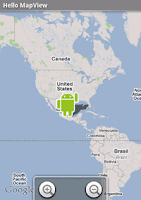
Found this while following through the Android Hello-MapView guide at developer.android.com . Theres this particular line at when you copy over into your code, it will give you error for the " R.drawable.androidmarker cannot be resolved ". mapOverlays = mapView . getOverlays (); drawable = this . getResources (). getDrawable ( R . drawable . androidmarker ); itemizedoverlay = new HelloItemizedOverlay ( drawable ); You can solve this easily by replacing "androidmarker" with "icon", which shown in the code below. mapOverlays = mapView.getOverlays(); drawable = this.getResources().getDrawable(R.drawable.icon); itemizedoverlay = new HelloItemizedOverlay(drawable); Note that I am using the default "Icon" for application here. As a result, you will get the icon shown in the image below - the application icon. :) Actually, you can call the other default icons listed in Android API by calling android.R.drawable class. For example, mapOve...