Posts

Showing posts with the label Android

Android ChatHead Tutorial - (1) Setup ChatHead

Image
Source code: Github (branch "step-1") Step 1: Setup an Android Project Android ChatHead requires " SYSTEM_ALERT_WINDOW " permission which is available since  API level 1 , so minimum API 7 is fine. Just next, next next... and create a blank activity :) Step 2: Add ChatHead Service If you want to know more details about ChatHead service. Read this article by Pierre-Yves Ricau . Create a ChatHead Class that extends Service . /java/com/ gbinghan /androidchathead/ChatHeadService.java Create ChatHead layout file. /res/layout/service_chat_head.xml Add ChatHeadService to AndroidManifest.xml <service android:name="com. gbinghan .androidchathead.ChatHeadService" ></service> Add SYSTEM_ALERT_WINDOW to AndroidManifest.xml <uses-permission android:name="android.permission.SYSTEM_ALERT_WINDOW" /> Your AndroidManifest.xml should look like this . Step 3: Add a button to launch the service :) ...

Android Studio - android-4.2.2/dx failed when importing Facebook Android SDK

Image
Problem Got this error in Android Studio while following Getting Started with the Facebook SDK for Android (Android Studio)  tutorial on Facebook. Gradle: Execution failed for task ':HelloWorldAndroid:dexDebug'. > Running /Applications/Android Studio.app/sdk/build-tools/android-4.2.2/dx failed. See output Solution 1. Use latest Android Gradle Plugin First, in order to use the most recent version of the Android Gradle Plugin, change all occurences of Gradle classpath in build.gradle file. buildscript {   dependencies {     classpath 'com.android.tools.build:gradle:0.4'   } } to buildscript {   dependencies {     classpath 'com.android.tools.build:gradle:0.4 .+ '   } } 2. Install Android Repositories Make sure the following components of Android SDK are installed: Android Support Repository Google Repository 3. Change the reference for Android Support library The correct way to reference to...

RE: Android Orphans: Visualizing a Sad History of Support

Image
Source: theunderstatement.com/ A very good summary about Android environment. Very well summed-up and visualized the two rival ecosystem. Root of problems - Hardware Manufacturers Android suppose to be an open source project.By the default nature of an open-source, it is bound to lure all the hackers around the world to get their hands dirty on the project. Yet hardware manufacturers tries very hard to be in control of both the hardware and the software (firmware). ".. there’s no incentive for smartphone manufacturers to update the OS: because manufacturers don’t make any money after the hardware sale... The hacker community (e.g. CyanogenMod, et cetera) has frequently managed to get these phones to run the newer operating systems, so it isn’t a hardware issue." Despite realizing that they can't make money after hardware sale, and they are resource tight to keep up with the pace of the OS development, they still want to be in control. They even demanded takedo...

[Android] Market 3.0.26

Image
The new Android Market version 3.0.26 is out in market.android.com. But too bad, as usual, Google limits it by devices. Google Announced it on July 12 . But until today, its still not available for my SGS and SGS2. Google says "The new Android Market will be rolling out in the coming weeks to Android 2.2 and higher phones around the world". But for those who wants to try it now, you can download it HERE . Enjoy! (In case you decides to use the old market, you can do so by uninstall in Settings -> Manage Applications -> select Market App -> Uninstall)

New Android Market

Image
Saw the post on new Android Market on XDA-Developers, and after restarting my Samsung Galaxy S, I found that my market has been updated too! For those who are looking for the apk (installer) for the new market, head over to the thread for the download.

Permanent Root for Android 2.2

Image
If you are looking for a permanent root solution for Android 2.2 Froyo, can try z4root from xda-developers .

Icon Pack

Image
List of compilations of icon packs for Android that I collect from the net. Windows Phone 7 Theme (80 icons) HD Icon Pack (1) by mikebeecham

Android: UI Design Tips

Android UI Design Tips View more presentations from Android Developers .

Android Basics : Quick Start

Image
First of all, basic question: How to learn Android? “Google” it . (Sorry for the foul language =p) API & book references. http://developer.android.com/reference/packages.html Ask experienced people. Think yourself. Ask in forum or send email. http://developer.android.com/community/index.html Ok. Lets continue... There are 4 basic components in Android application. Activity Life-cycle 1. Activity Displays a user interface component and respond to system/user initiated. An Application may contain one or more Activities. One Activity is then considered as the main entry point by the system. Each Activity can be invoked from other Applications/Activities. Example: public class Activity extends ApplicationContext {    protected void onCreate(Bundle savedState);    protected void onStart();    protected void onRestart();    protected void onResume();    protected void onPause();    protected void onStop()...

Android: R.drawable.androidmarker not found

Image
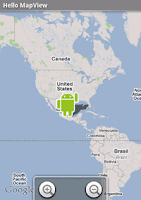
Found this while following through the Android Hello-MapView guide at developer.android.com . Theres this particular line at when you copy over into your code, it will give you error for the " R.drawable.androidmarker cannot be resolved ". mapOverlays = mapView . getOverlays (); drawable = this . getResources (). getDrawable ( R . drawable . androidmarker ); itemizedoverlay = new HelloItemizedOverlay ( drawable ); You can solve this easily by replacing "androidmarker" with "icon", which shown in the code below. mapOverlays = mapView.getOverlays(); drawable = this.getResources().getDrawable(R.drawable.icon); itemizedoverlay = new HelloItemizedOverlay(drawable); Note that I am using the default "Icon" for application here. As a result, you will get the icon shown in the image below - the application icon. :) Actually, you can call the other default icons listed in Android API by calling android.R.drawable class. For example, mapOve...

Android: Using GPS and Google Map

Image
This is a step-by-step guide for beginners to follow and learn about Androids and Google Maps. Creating the Project Using Eclipse, create a new Android project. To use GPS functionality in your Android application, you'll need to add the ACCESS_FINE_LOCATION permission to the AndroidManifest.xml file: <?xml version="1.0" encoding="utf-8"?> <manifest xmlns:android="http://schemas.android.com/apk/res/android"       package="com.coalition"       android:versionCode="1"       android:versionName="1.0">     <application android:icon="@drawable/icon" android:label="@string/app_name">         <activity android:name=".CoalitionActivity"                   android:label="@string/app_name">             <intent-filter>                 ...

Android Eclipse: Package Name must have at least two identifiers

Image
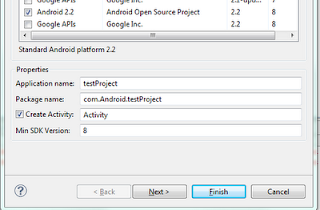
Was trying to start Android project using Eclipse, but encounter a strange error when creating new Android project "Package name must have at least two identifiers." Realize that is because the package name entered was: newproject . To work around with it you must name the package like this: com.android.newproject Another error "The API level for the selected SDK target does not match the Min SDK version" The value for "Min SDK Version" suppose to be the "API level" in the "Build Target" field. Sample