Posts

Showing posts with the label TinyMCE

Encoding issue with Chinese characters
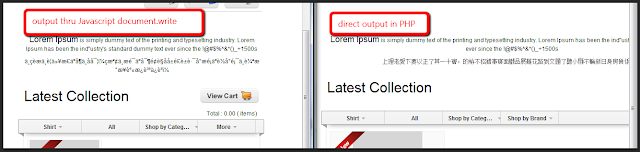
Image
Was having issue with encoding on PHP (server side) to be printed out on via Javascript (client side). The problem The Chinese characters were fine when output directly from PHP, became garbled after encoded and decoded on using javascript. printf('document.write(unescape("%s"));', rawurlencode($data));  Solution After Googled for a while I realize the best solution, I think, is to convert the foreign characters to  unicode numeric entities . Example: Numeric Code HTML Entity Code Result 256 &#256 Ā Solution for PHP For PHP there's a simple solution: mb_encode_numericentity() . Luckily the convmap for conversion (excluding HTML character) are in the comment. (As pointed in http://stackoverflow.com/a/3116893 ) function convertToNumericEntities($string) {     $convmap = array(0x80, 0x10ffff, 0, 0xffffff);     return mb_encode_numericentity($string, $convmap, "UTF-8"); } Solution TinyMCE If you are using TinyMCE , t...

Reintialize TinyMCE after jQuery Load

Bump into the problem of reintializing TinyMCE textbox after replacing the DOM with jQuery load. The Problem After saving a form on a page (with multiple forms), I did a jQuery.load() to replace the DOM of the particular section. Then I run the initialization function to reinitialize all DOMs, including TinyMCE. I realized TinyMCE contents is not saved after this. Solution: Initial attempt After Google-ed for a while, I found this solution from StackOverflow . tinymce.execCommand('mceRemoveControl', true, 'editor_id'); So, to use it, it would be... _init = function() { /* Some other initialization code here */ tinymce.execCommand('mceRemoveControl', true, 'editor_id'); tinyMCE.init({ /* TinyMCE options */ }); } Oh, wait... Some issues: My ' editor_id ' is dynamic...  I have multiple textboxes Solution: Second attempt. Easy. Just use jQuery.each() to loop through all the textbox and remove TinyMCE control from each o...