Posts

How to enable Facebook Comment reply function on Facebook Profile

Image
This is a guide on how to enable Facebook comment reply on your Facebook profile. Summary of steps: 1. Open Chrome 2. Enable emulate geolocation coordinate. 3. Set geolocation to New Zealand ("-41.211111", and "174.781111"). 4. Open touch.facebook.com 5. Select "Check in" 6. Open facebook.com 7. Comment reply should appear now!

Generate GoDaddy SSL Certificate (.crt) for Azure Websites (.pfx)

Image
Step 1: Getting GoDaddy SSL cert. Let's say you have a domain name of my_domain.com. You'll first need to generate the the .csr file for GoDaddy with the following command: openssl req -new -newkey rsa:2048 -nodes -keyout  my_domain.com .key -out  my_domain.com .csr This gives you 2 files: my_domain.com.key - This is the private key my_domain.com.csr - This is the Certificate Signing Request Copy the content of my_domain.com.csr file to the SSL signing authority (GoDaddy). Once approved, GoDaddy give you back a .zip file with the following 2 files: 18f1c77f369c0b59.crt - This is your cert gd_bundle-g2-g1.crt - This is the GoDaddy Certificate Chain Step 2: Convert a CERT/PEM certificate to a PFX certificate openssl pkcs12 -export -out  my_domain.com .pfx -inkey  my_domain.com .key -in 18f1c77f369c0b59.crt Step 3: Certificate to Upload to Azure. Step 4: Assign SSL Bindings. Step 5: Done! References : ...

Vulcan Poll

How to get Google Analytics View (Profile) ID

Image
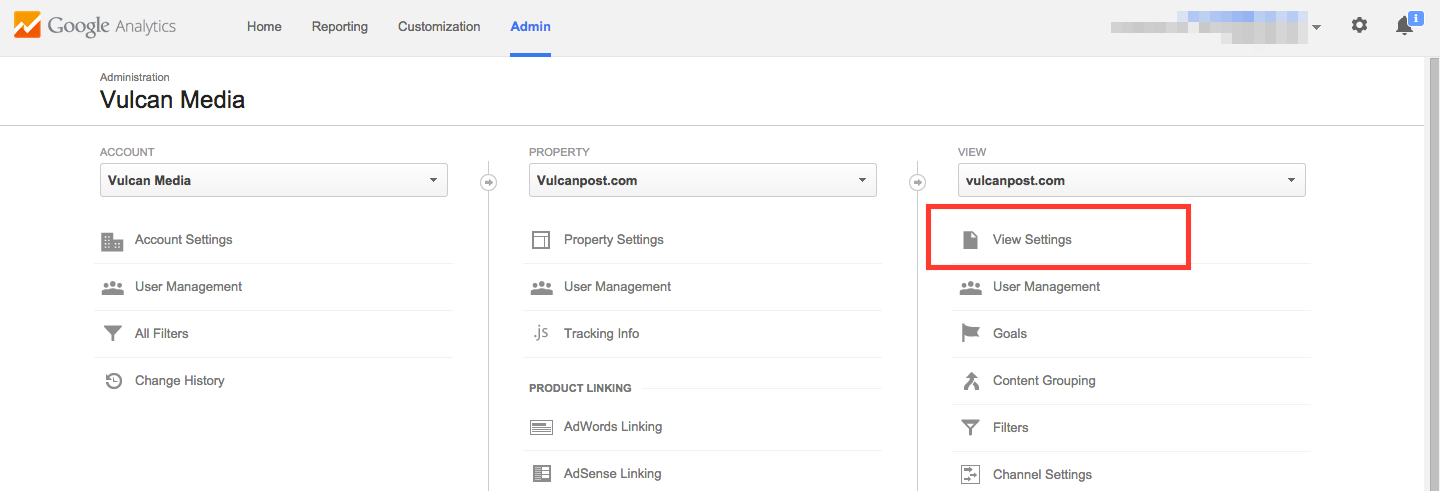
To find the View ID in your Google Analytics account: 1. Sign in to your Analytics account. 2. Select the Admin tab. 3. Select an account from the dropdown in the ACCOUNT column. 4. Select a view from the dropdown in the VIEW column. 5. Under VIEW, click View Settings.

Backup MySQL to Azure Storage in 30 Seconds

Image
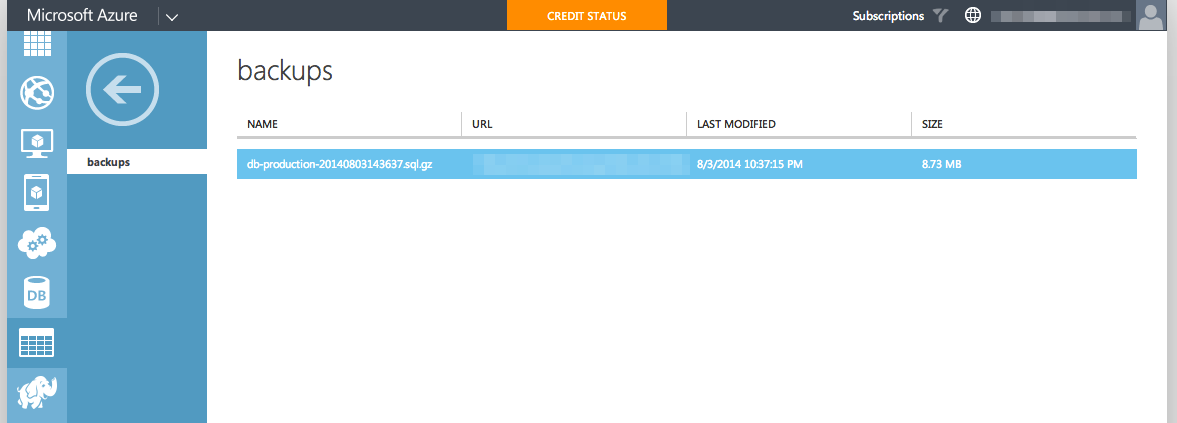
Step 1. Disable password prompt for "mysqldump command" mysqldump: Got error: 1045: Access denied for user 'root'@'localhost' (using password: NO) when trying to connect 1. Run " vi ~/.my.cnf " 2. Add the following lines [ mysqldump ] user = mysqluser password = secret 3. For Bitnami, you'll need to append the following line in " /opt/bitnami/mysql/my.cnf " !include ~/.my.cnf 4. Try running to see if the command works. mysqldump --all-databases > /home/bitnami/backups/db-backup.sql Step 2(a). Install Azure-CLI Prerequisites: Installing npm. sudo apt-get update sudo apt-get install nodejs sudo apt-get install npm Note: If you facing issue while installing nodejs/npm on Ubuntu 12.04, you can refer to his article for alternative way to install  https://rtcamp.com/tutorials/nodejs/node-js-npm-install-ubuntu/ , or this  http://stackoverflow.com/questions/16302436/install-nodejs-on-ubuntu-12-10#comment32...

Bitnami Setup Cron to Backup MySQL

Step 1. Disable password prompt for "mysqldump command" mysqldump: Got error: 1045: Access denied for user 'root'@'localhost' (using password: NO) when trying to connect 1. Run " vi ~/.my.cnf " 2. Add the following lines [ mysqldump ] user = mysqluser password = secret 3. For Bitnami, you'll need to append the following line in " /opt/bitnami/mysql/my.cnf " !include ~/.my.cnf 4. Try running to see if the command works. mysqldump --all-databases > /home/bitnami/backups/db-backup.sql Step 2. Setup Cron to Backup to MySQL Lets setup cron to run at 00:00, every midnight. Option 1: For manual insert into crontab file via " crontab -e " command 0 0 * * * /opt/bitnami/mysql/bin/mysqldump --all-databases | gzip > /home/bitnami/backups/db-$(date +\%Y\%m\%d\%H\%M\%S).sql.gz Note that you'll need to escape the "%" characters, because cron will see it as end character and ignore ...

Wordpress "Stable Tag" not updating

Image
PROBLEM: Was updating one of my Wordpress plugin, and find it weird that the Wordpress Plugin Directory does not reflect the changes correctly although I've changed the " Stable tag " in readme.txt. According to Wordpress Plugin " Task 3: "Tagging" a new version " guide, you'll need to edit the trunk/readme.txt beforehand. SOLUTION: That is not enough! In the end, I found out that you will need to update BOTH: trunk/readme.txt trunk/{your-plugin-name}.php Hope this helps!