Posts

[Apache AccessLog] %2f..%2f..%2f..%2fetc%2fhttpd%2flogs%2ferror.log

Image
Recently reviewed the Apache Accesslog for one of the sites I'm handling. Got a bunch of entries in my access log that looks like these 54.208.35.151 - - [27/Nov/2013:13:27:58 +0800] "GET /wp-content/plugins/theia-post-slider/js/balupton-history.js/history.js?ver=.. %2f..%2f..%2f..%2f..%2f..%2f..%2f..%2f..%2f..%2fetc%2fhttpd%2flogs%2ferror.log HTTP/1.1" 404 - "http:// [this-is-intentionally-masked] .com/" "Mozilla/4.0 (compatible; MSIE 6.0; Windows NT 5.1; SV1; .NET CLR 1.1.4322; ScanToSecure)" or 54.208.35.151 - - [27/Nov/2013:13:30:11 +0800] "GET /wp-content/plugins/sociable/css/sociable.css?ver= ..%2f..%2f..%2f..%2f..%2f..%2f..%2f..%2f..%2f..%2fvar%2flog%2fapache%2ferror.log HTTP/1.1" 200 5687 "http:// [this-is-intentionally-masked] .com/" "Mozilla/4.0 (compatible; MSIE 6.0; Windows NT 5.1; SV1; .NET CLR 1.1.4322; ScanToSecure)" Notice that the second example is actually a HTTP 200 OK status request. Mea...

Liquid Cooling using 3M™ Novec 7000

Image
Liquid Cooling experiment by  Corvalent Corp From the video description: This is a video of an engineering experiment we conducted cooling a computer by completely submerging it in liquid. This liquid submersion cooling system is NOT using mineral oil, or any type of oil cooling. This experiment was done using a chemical made by 3M called Novec™ 7000. It has a low boiling point, and leaves no residue or any trace whatsoever behind on the motherboard. The board was equipped with an i3 processor, running at 100% load.  3M™ Novec™ 7000 Engineered Fluid. 3M™ Novec™ 7000 Engineered  Fluid The "magic" behind this is the 3M™ Novec™ 7000 Engineered  Fluid . The liquid has low boiling point, low-toxicity, is 100% Ozone safe, and is used as heat transfer fluid for cooling reactors in pharmaceutical & chemical processing. The best property about this liquid is because its non conductive, you can have total immersion cooling system. No heat sink o...

My Thoughts on The Volvo Truck Advertisement Series

Image
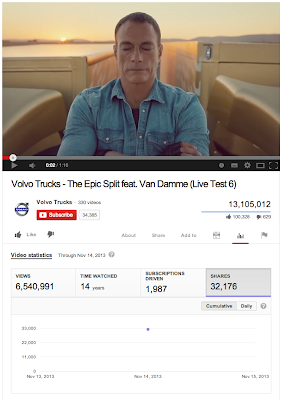
I was quite amazed by the Volvo advertisements that gone viral on all social media. If you haven't watch the videos, scroll to the bottom of the post and watch 'em all. As what the president of Volvo Trucks, Claes Nilsson mentioned it (in " Live Test 4 "): I've learned that when you want to make a YouTube hit, you need the hook at the beginning of the film. And here it is. I think the Volvo Truck advertisements were brilliantly executed. Overall Statistics These are the statistics I compiled from Youtube. As of 16 Nov, the only available stats are until 14th Nov. Note: On 16th Nov, "Live Test 6" already have 13,105,012 views. As of November 14 2013 Volvo Truck subscribers:  34,385 . Total subscription from 6 Videos:  4,062 . % new subscribers from all videos: 11.81% The most successful video Among these video, the most successful one is  The Epic Split feat. Van Damme (Live Test 6) This video has 32,176 shares (0.49% shar...

225019099301.apps.googleusercontent.com

Image
Recent activity on my Gmail just revealed that there's this app "Authorized Application (225019099301.apps.googleusercontent.com)" from IP address 54.235.159.144 assessing my Gmail. The IP address is from a Amazon server ec2-54-235-159-144.compute-1.amazonaws.com. ( IP Lookup ). And blacklist check ( http://whatismyipaddress.com/blacklist-check ) shows that the IP is clean too. Clicking on the "Manage Account Access" didn't give any information on the application "225019099301.apps.googleusercontent.com". After Googling, it appears that the app is Mailbox (source:  http://productforums.google.com/forum/#!topic/gmail/9LVW_etXyTE ) To make things easy, Google should show the applications with their ID.

[Azure Websites PHP] Cross Domain request results in blank response page after Preflight HTTP OPTIONS

Image
THE PROBLEM I've deployed a REST API application ( CodeIgniter with Phil Sturgeon's Rest-Server library ) on Azure Websites. Although I've set the Access-Control-* header in my PHP application: header('Access-Control-Allow-Credentials: true'); header('Access-Control-Allow-Origin: *'); header('Access-Control-Allow-Methods: GET, POST, DELETE, OPTIONS'); header('Access-Control-Allow-Headers: Origin, X-Requested-With, Content-Type, Accept'); (If you need a working test file, here's the gist for the test file) But Azure Websites server doesn't return the headers in response. And thus all requests to the server failed with the error message: Origin http://example.azurewebsites.net is not allowed by Access-Control-Allow-Origin.   In order to make sure there's no problem with my application, I've deployed the same code to Appfog.com . And as expected, the application works just fine. The same application d...

[Safari] Cookies for iFrame domain not set

Image
The Problem Apple's Safari web browser is configured to block third-party cookies by default, unless the user has had prior interactions with the third-party domain: http://webpolicy.org/2012/02/17/safari-trackers/ The Solution The idea is simple, just make sure the user visits the iframe domain (in this example, B.com) at least once. One way is to run a popup that visits B.com (and set the P3P header ), then close the popup. On the parent window: var win = window.open(' http://B.com /startsession.php', '_blank', 'height=200,width=150'); setTimeout(function() { win.close(); // close it after 1 second :) }, 1000); Then in the startsession.php , just set the header will do <?php header('P3P: CP="IDC DSP COR CURa ADMa OUR IND PHY ONL COM STA"'); session_start(); Done. References: http://webpolicy.org/2012/02/17/safari-trackers/ http://anantgarg.com/2010/02/18/cross-domain-cookies-in-safari/ http://anantgarg...

Android ChatHead Tutorial - (1) Setup ChatHead

Image
Source code: Github (branch "step-1") Step 1: Setup an Android Project Android ChatHead requires " SYSTEM_ALERT_WINDOW " permission which is available since  API level 1 , so minimum API 7 is fine. Just next, next next... and create a blank activity :) Step 2: Add ChatHead Service If you want to know more details about ChatHead service. Read this article by Pierre-Yves Ricau . Create a ChatHead Class that extends Service . /java/com/ gbinghan /androidchathead/ChatHeadService.java Create ChatHead layout file. /res/layout/service_chat_head.xml Add ChatHeadService to AndroidManifest.xml <service android:name="com. gbinghan .androidchathead.ChatHeadService" ></service> Add SYSTEM_ALERT_WINDOW to AndroidManifest.xml <uses-permission android:name="android.permission.SYSTEM_ALERT_WINDOW" /> Your AndroidManifest.xml should look like this . Step 3: Add a button to launch the service :) ...