Posts

Reintialize TinyMCE after jQuery Load

Bump into the problem of reintializing TinyMCE textbox after replacing the DOM with jQuery load. The Problem After saving a form on a page (with multiple forms), I did a jQuery.load() to replace the DOM of the particular section. Then I run the initialization function to reinitialize all DOMs, including TinyMCE. I realized TinyMCE contents is not saved after this. Solution: Initial attempt After Google-ed for a while, I found this solution from StackOverflow . tinymce.execCommand('mceRemoveControl', true, 'editor_id'); So, to use it, it would be... _init = function() { /* Some other initialization code here */ tinymce.execCommand('mceRemoveControl', true, 'editor_id'); tinyMCE.init({ /* TinyMCE options */ }); } Oh, wait... Some issues: My ' editor_id ' is dynamic...  I have multiple textboxes Solution: Second attempt. Easy. Just use jQuery.each() to loop through all the textbox and remove TinyMCE control from each o...

[Guide] Samsung Galaxy S2 ICS

Image
For those of you who are like me - too impatient to wait for Samsung Singapore to release ICS update for i9100 Galaxy S2, can follow the following steps to flash to ICS (and in addition, flash to CM9). Ice Cream Sandwich  Android I9100XWLP7 4.0.3 (United Kingdom / Ireland) 1. Download ICS firmware http://www.hotfile.com/dl/153177481/9861a3a/I9100XWLP7_I9100XEULP5_XEU.zip.html 2. Boot into Download Mode Turn off phone. Vol Down + Home + Power 3. Odin Flash Guide http://forum.xda-developers.com/showthread.php?t=1075278 http://forum.xda-developers.com/showthread.php?t=1406664 ICS is cool, but... the official ROM is still laggy. So I decided to take further steps to mod it to CyanogenMod. So if you are like me, want a smooth UX, follow the following optional steps :) Root 3. CF-root by Chainfire . http://forum.xda-developers.com/showthread.php?t=1103399 4. Remove Yellow Triangle during startup, using TriangleAway from Chainfire . htt...

Why Hotmail SmartScreen Should do Better

Image
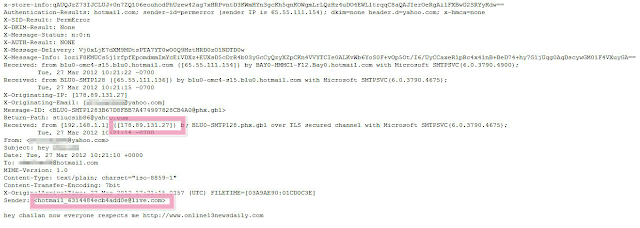
Got this spam mail that looks as if its from my other email account (Yahoo Mail). Further inspect on the header reveals that the mail is from hotmail_631448ecb4add0e [at] hotmail.com. And the mail server is actually from the IP 179.89.131.27. Why Hotmail SmartScreen not doing its job SmartScreen should have filtered the email content, based on EITHER one of the following criteria, that can be implemented by checking just the email header. 1. The email content is obviously spam content. Nuff said. 2. The sender is obviously from a "anonymous" email that pretends to be another email. 3. The IP (179.89.131.27) of the mail server is OBVIOUSLY hosted on a spam source. This can be easily detected by cross-check with one of the spam database out there. For example http://www.dnsbl.info/ . These are simple methods to provide minimal layers protection for Hotmail users.  (Notice I haven't even go into advanced SPAM fighting techniques like using  DMARC ) Takea...

Bootstrap Tools

Image
Biggest Mistakes The biggest mistakes for new (or inexperienced) developers, like me, is to jump straight into coding a website. There are so many bootstrap tools (or so caller boilerplates) out there for you to start, without falling into the pitfalls of bad (really bad) designs. I'm speaking from my personal experience, with Lunchsparks . Along the way of "designing" and coding, both at the same time, I poorly designed the elements in the website, from layouts (grids, containers, tables) to buttons (color, states). The Tools These are two tools that I came across recently, which I think its awesome! These tools encapsulated the almost (if not all) the elements for designing a great (responsive) website. Bootstrap, from Twitter Bootstrap, from Twitter A very clear demo site that demonstrate what the tools (javascripts, and css) does. Recommended for new learners. HTML5 Boilerplates HTML5 Boilerplates By Paul Irish . A very cool Googler that I fo...

[CodeIgniter] MySQL NOW()

Was trying to do insert/update using CodeIgniter Active Record helpers, and realize the usual way of inserting doesn't work, because the helper functions actually escaped the values to prevent SQL injection. So we can't do the just group all the data together the easy way. $data['field1'] = $data1; $data['field1'] = $data2 $data['created_date'] = 'NOW()'; $this -> db -> insert($this -> tables['some_table'], $data); There are two possible ways to go around this. 1. Use CodeIgniter $db -> set() function, with the additional FALSE parameter to prevent data from being escaped. $this -> db -> set('created_date', 'NOW()', FALSE); $this -> db -> insert($this -> tables['some_table'], $data); 2. Use PHP data function to generate datetime string. The only thing to note with this method is, in most cases, the PHP server time and the MySQL time is different. $data['created_dat...

[Template] Javascript Functions

Been dealing with Javascript functions lately, I find that these are the most-frequently-used input parameters for all a typical function: data url (optional)  callback (optional) A good JS function should readily accept these parameters. And a typical Javascript function call would be like: somefunction( {data: value, data2: value2 }, [url], [callback()] ); We know that in PHP we can use the following method to write a "optional" second (or third) input parameter. function somefunction( $data, $callback = FALSE); This way, if the second argument is not supplied, $callback  will be automatically assigned to FALSE . Its a good practice to set a default value for a variable. After Googling around, I found that Javascript is event better at handling such case. We can take in as many optional input parameters, in no specific order . But the trade-off is, we need a check for the input parameter type. Stackoverflow has this excellent post on the template for...

CSS text-overflow

Image
Notice : This is a beginner post (that some of you might think is a waste of time) CSS3 has tons of awesome improvement, which a lot of them I don't know or notice. Today, I discovered " text-overflow " style, which is super handy for hiding overflowing text. I discovered while browsing the source for Gmail.com. (Actually I was looking a the scrollbar for the side panel wondering how it works and accidentally stumble upon this :p ). Notice the the longer text "Acquaintances" changes to "Acquaintan" when the width of the parent container shrinks. The style behind this is overflow: hidden; text-overflow: ellipsis; white-space: nowrap; You might wonder why I'm so excited about this? Because in the past, I used to do a lot of text-length-checking on the server side before outputting the text, reducing the number of characters and append "...". Now this can be done easily on the browser part using just CSS! No more inef...