Posts

[Solution] Wordpress "An error occurred in the upload. Please try again later" error.

Image
Got this weird " An error occurred in the upload. Please try again later " error whenever I try to do media uploads in Wordpress. I've checked the folder permission, its correct. In fact, the files were uploaded successfully to wp-content > upload folder. I've tried all kinds of suggestion in forums (disable all plugins, enable them one by one... etc), but still no avail. In the end, I decided to do a "Re-install", and that... worked! And all the uploaded files were intact. ----- Didn't dig deep into finding out what causes the issue. But a wild guess would be something to do with the PHP codes. Because the uploaded files were stored in DB, although the upload status indicated "failed". Most likely something to do with the permission issue highlighted in this blog post .

List of Brainwave Headbands

Image
Melon Melon - $79 on Kickstarter Webpage: http://www.usemelon.com/ Kickstarter:  http://www.kickstarter.com/projects/806146824/melon-a-headband-and-mobile-app-to-measure-your-fo Muse Muse - $199 Webpage:  http://www.interaxon.ca/muse/

PayDollar Test Credit Cards

Was looking for Test Credit cards to test integration with AsiaPay/PayDollar via Google but couldn't find any. But manage to find one in the PHP sample source code . Card number: 4918914107195005 CCV: 123 Expiry Date: 07 2015 Card Holder: Test Card Extras . For first timer like me, I find PayDollar website & documentation slightly messy, and sometimes, the links on the site are broken. Integration Guide Home Page , v3.21 Sample Source Codes Can be found in Merchant Administration page > Support > Developer Corner The direct links are as follow: Client Post: PHP Direct Client Side: PHP Direct Server Side: PHP

GitHub Wiki - Anchor link for page headers

Image
Example "Table of Content" on "markdown-here" Was trying to do a table of content  in Github Wiki just now and realize there aren't much guide on that. After searching for a while, I found this comment on Github that shows how to do it. 1. Add anchor for the header that you want to link to # <a name="heading1"/> Heading 1 2. Add the link to the anchor [link to heading 1](#wiki-heading1) Example usage:

Amazon AMI install MongoDB Driver

Image
Did an installation of MongoDB driver for PHP on my Amazon EC2 AMI just now. And thought of noting the steps down. Prerequisites  Make sure the following packages are installed. $ sudo yum install gcc $ sudo yum install make $ sudo yum install httpd mod_ssl $ sudo yum install php $ sudo yum install php-devel php-pear $ sudo yum install pcre-devel Install MongoDB driver for Amazon Linux Installing Mongo driver. $ sudo pecl install mongo Enable the driver $ sudo vi /etc/php.d/mongo.ini $ extension=mongo.so $ sudo /sbin/service httpd restart Testing The simplest way to check whether the installation is successful is via phpinfo() . <?php phpinfo(); ?> And you should see the following section: Or test the connection using the code snippet below :) <?php // connect $m = new Mongo("mongodb://mongodb-user:mongodb-password@ds031087.mongolab.com:31087/sample-test-mongodb"); // select a database $db = $m->{"sample-test-mongodb...

Encoding issue with Chinese characters

Image
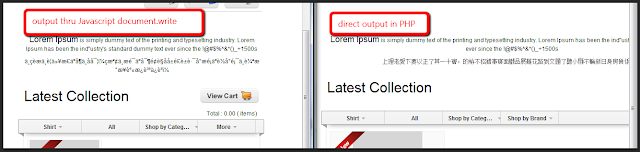
Was having issue with encoding on PHP (server side) to be printed out on via Javascript (client side). The problem The Chinese characters were fine when output directly from PHP, became garbled after encoded and decoded on using javascript. printf('document.write(unescape("%s"));', rawurlencode($data));  Solution After Googled for a while I realize the best solution, I think, is to convert the foreign characters to  unicode numeric entities . Example: Numeric Code HTML Entity Code Result 256 &#256 Ā Solution for PHP For PHP there's a simple solution: mb_encode_numericentity() . Luckily the convmap for conversion (excluding HTML character) are in the comment. (As pointed in http://stackoverflow.com/a/3116893 ) function convertToNumericEntities($string) {     $convmap = array(0x80, 0x10ffff, 0, 0xffffff);     return mb_encode_numericentity($string, $convmap, "UTF-8"); } Solution TinyMCE If you are using TinyMCE , t...

Uncaught SyntaxError: Unexpected token ILLEGAL

Image
Was coding in NetBeans just now and stumbled upon this error: Uncaught SyntaxError: Unexpected token ILLEGAL  I'm very sure there is no syntax error on that line. But chrome just wouldn't stop complaining about it. After debugging for a while, I realize its the extra unidentified character (space/eol) that is causing the error. Deleting that solves the problem :)